
Devices Component Asset Manager
A centralized digital asset library that brought the entire Amazon Devices creative catalog under governance, making automated campaign publishing possible at global scale.
Role
Lead UX Designer
Timeline
Ongoing (Estimated Q2 2026)
Team
PM, 8 Engineers, Designer Ops, Brand leaders

The real design work was understanding how fragmented global workflows operated, then building the structure needed to bring them together ultinately changing their processes. The heaviest lift was the user research I owned with end users across Amazon, which shaped the architecture and helped me uncover actual workflow bottlenecks. From there, the challenge was aligning teams across regions and designing a system both sides could trust enough to adopt. What looks simple on the surface is the result of research, architecture, and stakeholder alignment underneath.
The Problem
Marketing images for Amazon Devices were scattered across internal systems with no consistent naming, no access control, and QA handled through third-party tools outside the platform. The library feeding Image Builder was manually curated by a single person, so every asset in the pipeline depended on them getting it right.
No metadata, no access control, external QA. One person manually curated the library feeding Image Builder.
I interviewed marketers across EMEA and North America and brought working prototypes into the sessions. Their workflows were different, but both teams had stopped trusting the existing system. EMEA had built workarounds around missing features; North America had moved its asset workflow into Smartsheets entirely.
Watching Luxemburg merchandisers work exposed problems interviews never would. The gap between EMEA and NA shaped the architecture.
The System
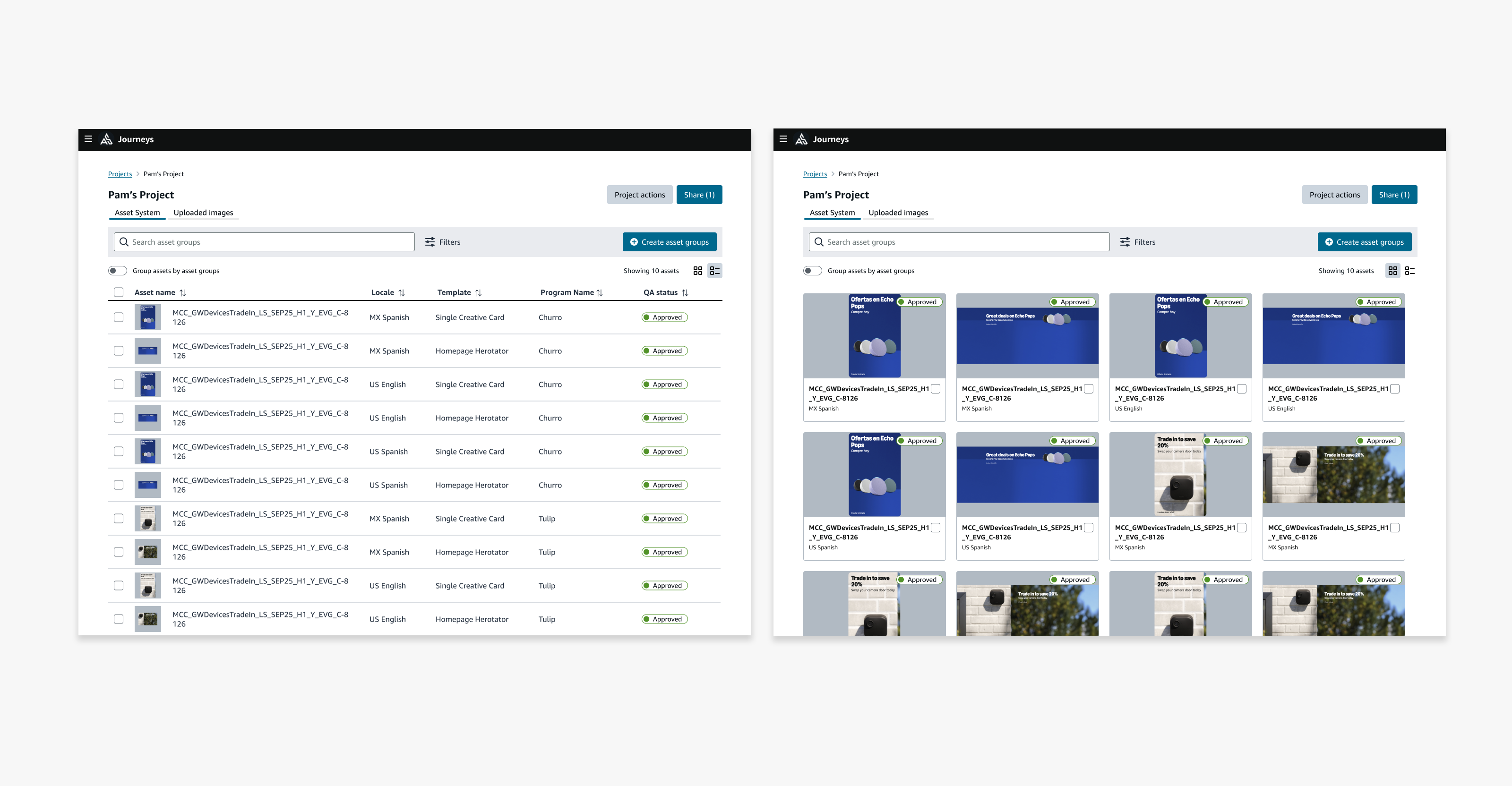
The architecture separates Image Builder assets from manual uploads because the two needed different ways of being managed. Tile and table views support visual browsing and metadata-heavy work, while filters make it possible to narrow thousands of assets by device, campaign, locale, template, or QA status.
The two-tab architecture. EMEA pushed for the split; mixing asset types forced users to track which rules applied when.
Tile for visual scanning. Table for metadata density. EMEA gravitated toward the spreadsheet; designers preferred the gallery.
Once metadata was in place, filtering became the primary navigation. Finding an image went from asking someone to a few clicks.
Design and Build
Four rounds of exploration led to the current architecture. The final design brought the asset detail view and QA workflow into the same place, so marketers could find an image, understand its context, and review it without jumping between projects or tools.
Early exploration. Persistent filters handled volume but mixed asset types without enough distinction.
Filter drawer. Cleaner, but the side panel ran out of room as requirements grew.
Group detail view. Actions were buried and approval logic was unclear.
Flat tile vs grouped. The grouped model was a step forward but tiles were visually identical across both.
Click an image, see everything: program, locales, dimensions, QA status, edit history. Actions live in the same view.
QA workflow. Filters pull assets from across groups into a single review panel. No more opening Image Builder one marketplace at a time.
Build spec covering the full browsing, filtering, and QA flows, validated through EMEA and NA sessions.
Result
Slated to ship Q2 2026. The structure, metadata model, and governance framework are in place. When it launches, approved assets move directly into automated campaign publishing.